
Another nice website to send free sms to Pakistan, chars limit 260, can receive sms replies on web also, Registration required.
Compatible with mobile browsers like ucweb and opera mini.
http://www.freesms.com.pk
Tip: Right click on the banner blow and open it into a new windows or tab.

Showing posts with label Internet. Show all posts
Showing posts with label Internet. Show all posts
September 8, 2009


September 2, 2009
Opera 10 - A first look at this fabulous web browser
Opera 10 has been released. This release of Opera sports a number of alluring, new features, many of them not seen in any of its contenders. The enhancements to look out for in Opera 10 are as follows.

Opera Turbo when enabled will boost your browsing speed by a significant factor. This increase in speed is more pronounced when you are browsing on a slow Internet connection like a dial-up. Opera achieves this by acting as a web proxy to your client. The servers at Opera will retrieve your web page, compress it and then send it to your browser thus reducing the size of data and consequently boosting speed. Among other means, the compression is achieved by image down-sampling therefore some level of distortion in graphics may occur.
Opera 10 is upto 40% faster than its predecessor. Check out the web specifications supported in Opera presto 2.2 - the web engine powering Opera. Though this benchmark puts it a little (6 percent) behind Google Chrome 2.0.172.

Now you can configure speed dial to show upto 25 of your frequently visited websites. And you can provide a custom background too.
Innovative visual tabs display web pages in thumbnails. To see the visual tabs in Opera 10, just stretch the tab border south and the tabs will be magically transformed into ones with visual appeal.

Opera now allows you to choose your preferred web mail such as Gmail, Yahoo or any of the scores of web mail services as your default mail client in Opera. This means that when you click on a email link, Opera opens your preferred web mail instead of the default email software on your machine. This is true for all your RSS feeds as well. If you use Google reader to subscribe to websites, then you can configure Opera to import all your RSS feeds into Google reader by default.
Opera 10 has support for rich text editing in mail client. You can use bullets, change the font properties of characters as well as insert images inline.
These are the major, albeit a subset of new features in Opera 10.
Opera is available for multiple platforms including Windows, Linux, Mac OS X, FreeBSD and Solaris; As well as some lesser known operating systems such as QNX, OS/2 and BeOS. And it comes in more than 43 different languages. Opera has always strived for full standards compliance. Not surprisingly, Opera 10 boasts of a 100/100 score in the Acid 3 test.

It is remarkable really that Opera, a company which has just one product - namely a web browser - has been so successful in making money. It's annual revenue stands at a significant $79.5 million dollars. [Source : Business Week].
If you are using Debian or one of its derivatives like Ubuntu, then there is a repository for Opera from which you can download Opera 10 using apt-get or dpkg. Visit deb.opera.com for details. Of course, you can also download Opera 10 for your Linux distribution directly from its website.
Opera 10 for Linux is built using Qt3. But a Qt4 port is also available for download at the following location.
Finally, here is a very well made video showcasing all the important features built in Opera 10.
Opera Turbo

Opera Turbo when enabled will boost your browsing speed by a significant factor. This increase in speed is more pronounced when you are browsing on a slow Internet connection like a dial-up. Opera achieves this by acting as a web proxy to your client. The servers at Opera will retrieve your web page, compress it and then send it to your browser thus reducing the size of data and consequently boosting speed. Among other means, the compression is achieved by image down-sampling therefore some level of distortion in graphics may occur.
Opera 10 is much faster
Opera 10 is upto 40% faster than its predecessor. Check out the web specifications supported in Opera presto 2.2 - the web engine powering Opera. Though this benchmark puts it a little (6 percent) behind Google Chrome 2.0.172.
Improved speed dial settings

Now you can configure speed dial to show upto 25 of your frequently visited websites. And you can provide a custom background too.
Visual Tabs
Innovative visual tabs display web pages in thumbnails. To see the visual tabs in Opera 10, just stretch the tab border south and the tabs will be magically transformed into ones with visual appeal.

Web mail integration
Opera now allows you to choose your preferred web mail such as Gmail, Yahoo or any of the scores of web mail services as your default mail client in Opera. This means that when you click on a email link, Opera opens your preferred web mail instead of the default email software on your machine. This is true for all your RSS feeds as well. If you use Google reader to subscribe to websites, then you can configure Opera to import all your RSS feeds into Google reader by default.
Rich text support for Opera mail client
Opera 10 has support for rich text editing in mail client. You can use bullets, change the font properties of characters as well as insert images inline.
These are the major, albeit a subset of new features in Opera 10.
Opera is available for multiple platforms including Windows, Linux, Mac OS X, FreeBSD and Solaris; As well as some lesser known operating systems such as QNX, OS/2 and BeOS. And it comes in more than 43 different languages. Opera has always strived for full standards compliance. Not surprisingly, Opera 10 boasts of a 100/100 score in the Acid 3 test.

It is remarkable really that Opera, a company which has just one product - namely a web browser - has been so successful in making money. It's annual revenue stands at a significant $79.5 million dollars. [Source : Business Week].
How to install Opera 10 in Ubuntu
If you are using Debian or one of its derivatives like Ubuntu, then there is a repository for Opera from which you can download Opera 10 using apt-get or dpkg. Visit deb.opera.com for details. Of course, you can also download Opera 10 for your Linux distribution directly from its website.
Opera 10 for Linux is built using Qt3. But a Qt4 port is also available for download at the following location.
Opera 10 Reviewer's guide
Finally, here is a very well made video showcasing all the important features built in Opera 10.
August 29, 2009
Some nice Google talk Bots
Some usefull Google talk bots which can bring some fun and useful for you when you are with your Google talk(Gtalk xmpp that is why I prefer Google talk on Yahoo and MSN etc)
What are bots? Here what wikipedia said “Internet bots, also known as web robots, WWW robots or simply bots, are software applications that run automated tasks over the Internet.”
Here I am going to introduce some usefull and interesting bots which you can use for free by adding them as Chat contact to your Google talk messenger
Get google talk
Aardvark BOT Add aardvark@vark.com as contact to your Google talk
Aardvark (vark.com) is very very nice service where people discuss and ask questions from each other, I by my own get too much knowledge from Var.com by using their Bot is fun.
Aardvark is currently in beta and invitation registration service only, You can use my invitation link to join this service
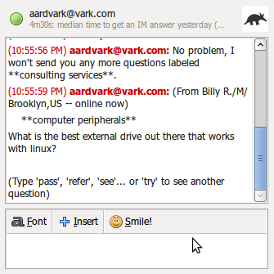 Click here to see what kind of questions people ask on Aardvark
And click here to play 20seconds video how Aardvark works
For the sake of knowledge one must use Aardvark :)
Official Google English to Instant messaging and Instant messaging to English translation BOT
To add this Bot add en2im@bot.talk.google.com to your Google talk as chat buddy.
The work of this Bot is to compress and uncompress English, useful when you have less space for text specially while typing sms.
Example,
Me: hello, What do you think I shall be doing in this Ramadan?
Output: hllo, What do U thnk I shll B dng in ths Ramadan?
Games Bot
To add Games bot add games@gtalkbots.com as chat buddy in your Google talk.
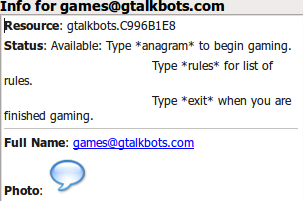 For text based games
iNeZha Rss feeds Bot
To add this bot add inezhabot@gmail.com as chat buddy in your Googletalk
This is another useful bot, used for fetching feeds of your favorite site or blog. You can remain updated with new feeds of your any fav RSS site using this bot within your Google talk, Whenever your added site gets feed update this Bot will notifiy you by sending you chat message with feed preview and full story link.
Joke teller Bot
To add this bot add joketeller@bot.im as chat buddy in your Google talk.
This bot gives English jokes.
Labnol Bot for webmasters and bloggers
to add this bot add labnol@bot.im as chat buddy to your Google talk.
 Type any word to this bot and it will give keywords suggestions for that your word taking form google search
Talkmayafile bot
to add this bot add talk@mayafile.com as chat buddy into your Google talk.
This bot can store your personal notes easily.
talkmayafile BOT: I store brief notes that you can retrieve later. It's easy. Just type /store to store a note and /find to find it later!
Hellotxt.com bot
to add this bot add im@hellotxt.com as chat buddy into your Google talk.
This is social networks bot, can update your status/micro blogs, to use this Bot must register at hellotxt.com
What are bots? Here what wikipedia said “Internet bots, also known as web robots, WWW robots or simply bots, are software applications that run automated tasks over the Internet.”
Here I am going to introduce some usefull and interesting bots which you can use for free by adding them as Chat contact to your Google talk messenger
Get google talk
Aardvark BOT Add aardvark@vark.com as contact to your Google talk
Aardvark (vark.com) is very very nice service where people discuss and ask questions from each other, I by my own get too much knowledge from Var.com by using their Bot is fun.
Aardvark is currently in beta and invitation registration service only, You can use my invitation link to join this service  Click here to see what kind of questions people ask on Aardvark
And click here to play 20seconds video how Aardvark works
For the sake of knowledge one must use Aardvark :)
Official Google English to Instant messaging and Instant messaging to English translation BOT
To add this Bot add en2im@bot.talk.google.com to your Google talk as chat buddy.
The work of this Bot is to compress and uncompress English, useful when you have less space for text specially while typing sms.
Example,
Me: hello, What do you think I shall be doing in this Ramadan?
Output: hllo, What do U thnk I shll B dng in ths Ramadan?
Games Bot
To add Games bot add games@gtalkbots.com as chat buddy in your Google talk.
 For text based games
iNeZha Rss feeds Bot
To add this bot add inezhabot@gmail.com as chat buddy in your Googletalk
This is another useful bot, used for fetching feeds of your favorite site or blog. You can remain updated with new feeds of your any fav RSS site using this bot within your Google talk, Whenever your added site gets feed update this Bot will notifiy you by sending you chat message with feed preview and full story link.
Joke teller Bot
To add this bot add joketeller@bot.im as chat buddy in your Google talk.
This bot gives English jokes.
Labnol Bot for webmasters and bloggers
to add this bot add labnol@bot.im as chat buddy to your Google talk.

Talkmayafile bot
to add this bot add talk@mayafile.com as chat buddy into your Google talk.
This bot can store your personal notes easily.
talkmayafile BOT: I store brief notes that you can retrieve later. It's easy. Just type /store to store a note and /find to find it later!
Hellotxt.com bot
to add this bot add im@hellotxt.com as chat buddy into your Google talk.
This is social networks bot, can update your status/micro blogs, to use this Bot must register at hellotxt.com
August 24, 2009
Google talk all emoticons
Complete list of all available google talk emoticons
| Emoticon | Type this... | to get this! |
 | <3 | heart |
 | :(|) | monkey |
 | \m/ | rock out! |
 | :-o | shocked |
 | :D | grin |
 | :( | frown |
 | X-( | angry |
 | B-) | cool |
 | :'( | crying |
 | =D | big grin |
 | ;) | wink |
 | :-| | straight face |
 | =) | big smile |
 | :-D | nose grin |
 | ;^) | big nose wink |
| ;-) | nose wink |
 | :-) | nose smile |
 | :-/ | skeptical |
 | :P | sticking tongue out |
Subscribe to:
Posts (Atom)

